Assignment
Assigning widget to a product
To add widget to a product we need to insert db record in the pages table. Pages table structure::
product_id
alias
type
internal_id
disabled
settings
The product_id field is the id of the product/integration which we want to use some widget.
Alias should be a unique string. The system is going to use this string to create a unique url for the combination of product_id/widget_id , so this way we can have multiple products using the same widget.
Internal_id is the id of the widget from the widgets table.
Disabled should be 0, if set to 1 the url of the widget wont 200 response.
Settings is a json encoded field containing settings used in the widget’s query builder component and the view file.
The widgets type is 5 so example insert would be:
product id:[my-product-id]
alias: baefa2e9c6e8557c286a9709973a5c78
type: 5
internal_id: [my-widget-id]
disabled: 0
settings:{"categories":["18","23","24","26","27"],"last_x_days":"362","backfill":"2","sorting":"0","rotations":"4","multi_page_advertorials":"2","newspaper_id":"76","product_id":"292"}
To ease the assignment of widgets and management of settings there’s a UI in the admin panel, which can be used to assign a widget to a product and properly set the widget settings for the selected product.
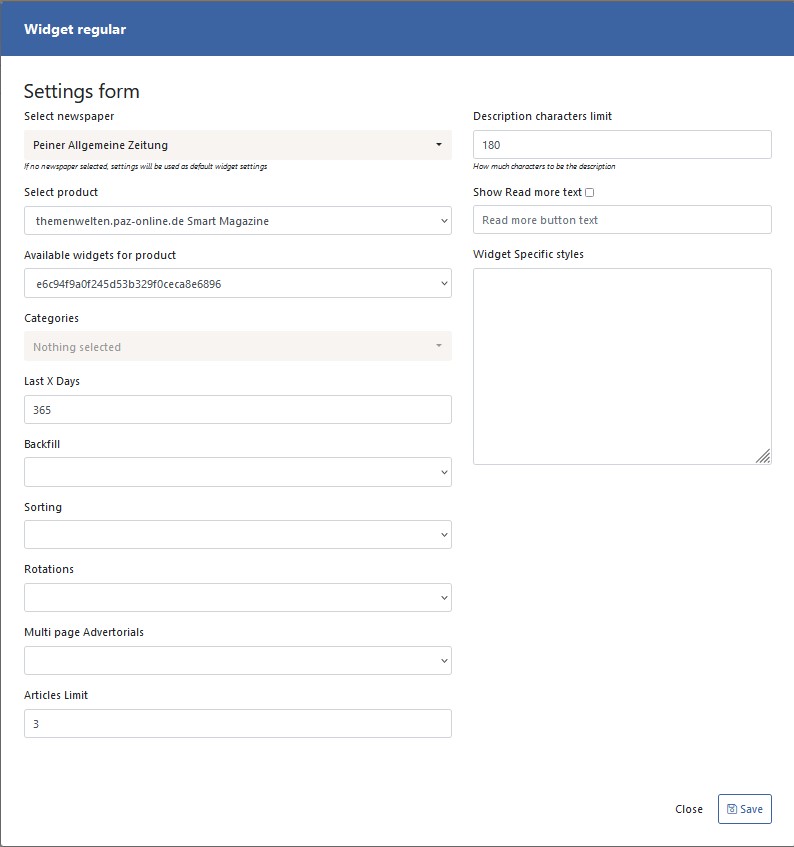 The form is available at:
 CMS-URL/tools/page-builder/widgets
After saving the widget you can render it and see how it looks like.
All of the registered widget assignments in the system are visible in:
CMS-URL/tools/page-builders/widgets/page
The following widget settings are supported:
{
    "categories": [],
    "last_x_days": 365,
    "backfill": 0,
    "sorting":  1,
    "rotations": 0,
    "multi_page_advertorials": 0,
    "limit": "3",
    "desc_limit": 180,
    "read_more": false,
    "read_more_text": null,
    "styles": "",
    "newspaper_id": "17",
    "product_id": "205"
}
These settings are used in app/Http/Livewire/Front/WidgetArticles.php (which is the main livewire component class for delivering widget articles) for query building purposes and some of them for view settings.
The settings supports the following options (array keys are used, array values serves as labels):
<?php return [
    'options' => [
        'categories' => [],
        'last_x_days' => 365,
        'backfill' => [
            0 => 'None',
            1 => 'Expand Categories',
            2 => 'Expand Time frame',
            3 => 'Specific Article IDs',
        ],
        'sorting' => [
            0 => 'Last articles',
            1 => 'Rotation'
        ],
        'rotations' => [
            0 => "Prio by time frame",
            // Articles from categories where factor field has greater value
            1 => "Prio by category factor",
            2 => "Prioritize by # ads",
            3 => "Prioritize by # of ad mm",
            4 => "Prioritize by page view"
        ],
        'multi_page_advertorials' => [
            // only magazines with hubpage images instead of direct articles
            0 => 'Consolidated as one advertorial with cover image and flap',
            // only articles with magazines but show articles directly
            1 => 'Dont show multi page advertorials',
            // all articles (dont matter with or without magazines)
            2 => 'Simple articles',
            // only articles without magazine
            3 => 'Consolidated articles'
        ],
        'limit' => 6,
        'desc_limit' => 180,
        'read_more' => false,
        'read_more_text' => null,
        'styles' => ''
    ]
];
Widget Links
Main Link
This is how the main link looks like:
<script id="trm-widget-{{widget-page-alias}}" src="https://trmwidget.eu/get/widget/{{product-domain}}/js/{{widget-page-alias}}"></script>
The widget-page-alias placeholder is the alias of the widget assignment in the pages table (currently MD5 Hashes are used) and the link contents the product domain url in {{product-domain}}. This ensures every widget to every product has a unique url.
Category link
<script id="trm-widget-{{widget-page-alias}}" src="https://trmwidget.eu/get/widget/{{product-domain}}/js/{{widget-page-alias}}/category/{{category-alias}}"></script>
The categroy widget link is the same as the main link except it contains a category url part at the end which specifies which category needs to be set in the query builder. The logics applied in the Query builder will be the same as specified in the settings array except the categories array will now contain the category id of {{category-alias}} which is passed in url.